
Customer Support

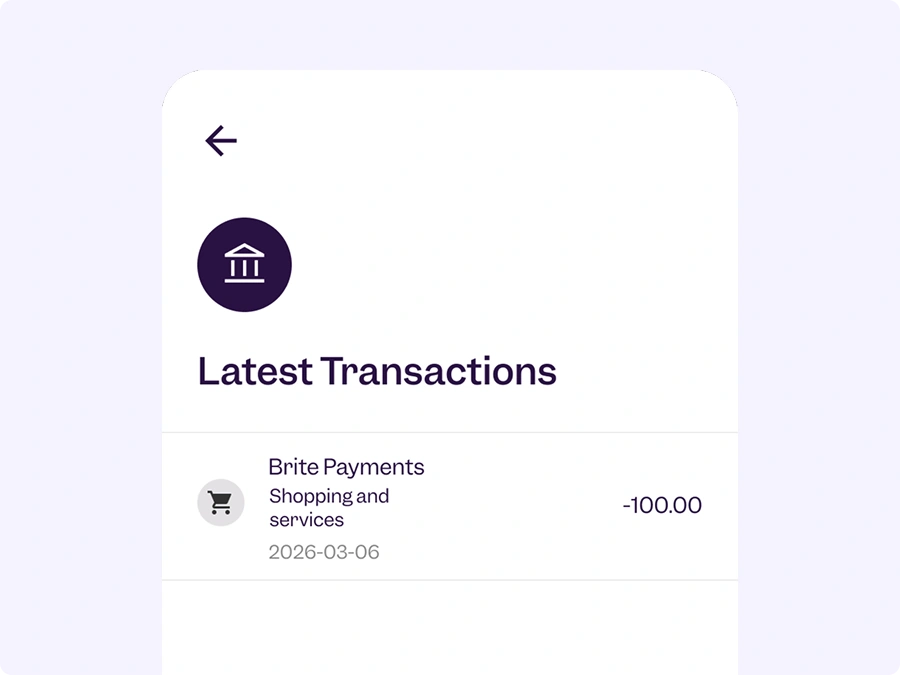
Why do I see Brite on my bank statement?
If you see Brite or Brite Payments on your bank statement, you probably bought something online that uses our payment product. Since we facilitate the payment process, you will see Brite on your bank statement.
We are unable to help you with questions about your order. For questions or complaints about your payment, please contact the merchant first.








Frequently asked questions
What is Brite and how does it work?
Brite is a Swedish fintech founded in 2019 and is a leader in Instant Account-to-Account payments (also known as Pay by Bank). With connections to over 3,800 banks, Brite Payments enables consumers to initiate payments and access their bank account in real-time.
Brite operates across 27 European markets, utilising local payment rails, open banking, and its own proprietary infrastructure, the Brite Instant Payments Network (IPN).
Simply select Brite Payments in the merchant’s checkout and follow a few simple steps to initiate a payment:
- Select your bank
- Select the bank account you want to initiate the payment from
- Confirm the payment initiation after the authentication with your bank
- And Done. You will receive the confirmation of the payment initiation from us.
Is Brite free to use?
Yes, absolutely.
Brite Payments is completely free for consumers to use. Brite will never charge you a fee to initiate a payment or access your bank account.
Is Brite safe to use?
Yes. Brite is a licensed Payment Institution supervised by the Swedish Financial Supervisory Authority (Finansinspektionen)under the Swedish Payment Services Act (lag (2010:751) om betaltjänster) and subject to very strict regulatory obligations.
Brite always provides its services at your request and based on your permission. When using Brite Payments to initiate a payment or to access your bank account, you will authenticate yourself directly with the authentication methods provided by your bank.
Which countries does Brite currently operate in?
You can always review which countries Brite has passported its authorisations to on the Swedish Financial Supervisory Authority’s (Finansinspektionen) website (https://www.fi.se/).
The countries where Brite is operational are: Austria, Bulgaria, Belgium, Croatia, Cyprus, Czech Republic, Denmark, Estonia, Finland, France, Germany, Greece, Hungary, Ireland, Italy, Latvia, Lithuania, Liechtenstein, Luxembourg, Malta, the Netherlands, Norway, Portugal, Romania, Slovakia, Slovenia, Spain, Sweden, and Switzerland.
Does Brite work with my bank?
Brite is connected to over 3,800 banks across Europe. It is likely that you can use Brite Payments with your bank.
When you select Brite in the merchant’s checkout, you will automatically see a list of the supported banks available in your country.
Why does “Brite” appear in the transaction history of my bank account?
Brite Payments enables you to initiate payments from your bank account to many stores and merchants online.
Because Brite also acts as the secure bridge between you and the store in relation to your payment, it is normal that “Brite” appears listed on your transaction history instead of the specific store where you made your purchase.
How can I find out which merchant I purchased from when I initiated a payment with Brite Payments?
If you see a transaction in your bank account history that you don’t recognise, you can contact us through our Customer Support Form.
To help us identify the merchant, please share the payment reference (starting with “RF…”). You’ll find the payment reference in the transaction history of your bank account.
Can I get a full history of my Brite transactions?
Yes. If you need a formal record of your transactions, we can send you a Transaction Certificate.
To request a Transaction Certificate, contact us through our Customer Support Form and share the following details so we can verify your bank account:
- A payment reference from a previous Brite transaction (starting with “RF…”) or your bank account number (IBAN).
- The time frame you want the Transaction Certificate to cover.
How long does it take a payment to be performed?
Brite Payments are designed to be instant. In most cases, your bank will execute the payment transaction only seconds after you initiate it via Brite Payments.
In rare cases, it may take several business days for the payment to be executed. For example, this could happen on bank holidays or if your bank is experiencing processing delays.
While execution of the payment is handled by your bank via general clearing systems, we always work to ensure your payment reaches the merchant as quickly as possible.
Why didn’t I receive a confirmation email from Brite when using Brite Payments?
Brite Payments is designed to be an easy and fast way for you to pay – you don’t even need to create an account or sign up to use Brite Payments. And since Brite Payments works instantly, a confirmation is usually displayed to you at the end of your transaction.
As to your purchase with the merchant, the merchant will send you a receipt or order confirmation. If you have not received a receipt or order confirmation, we recommend checking your spam folder or contacting the merchant directly.
Can I pay using a business bank account?
Can I use a joint bank account to make a payment?
Yes, you can use a joint bank account as long as you use your own personal bank login details (such as your banking app or biometric check, like Face ID).
Is there a limit on how much I can pay using Brite?
Brite does not set any purchase limits. However, to initiate large value payments via Brite Payments, you may be required to provide more information about yourself because of anti-money laundering measures.
Additionally, your bank may have its own daily or per-transaction limits set on your bank account.
If you are making a large purchase and the payment is declined, we recommend checking your transfer limits in your banking app or contacting your bank. Many banks offer you the ability to increase your transaction limits temporarily yourself before you make a payment.
Why is my bank asking me to use a physical token or card reader to pay via Brite?
Brite Payments relies on your bank’s authentication processes. This means your bank’s security process determines how you can log in to your bank account to initiate a payment or access your bank account.
For certain payments, such as transferring larger amounts or initiating a payment to a new beneficiary, your bank may require additional security measures. The bank may request you to use a physical token or card reader to authorise the payment.
The payment screen is stuck, or my mobile banking app didn’t open automatically. What should I do?
If the payment screen is not moving or your banking app doesn’t automatically open, don’t worry – your payment hasn’t been initiated yet. You can try to follow these steps to resolve it:
- Check your internet connection.
- Go back to the merchant’s checkout page, refresh, and try selecting Brite again to restart the payment initiation.
- If you are on a mobile device, double-check that you have the latest version of your banking app installed.
- If the issue persists on your mobile device, you can usually log in and perform the authentication in your mobile web browser instead.
- Sometimes pop-ups can be blocked on your selected web browser. Double-check that you have turned off any pop-up blocker.
If you are still having trouble, we recommend reaching out to us via our Customer Support Form to let us know you are experiencing the issue so we can investigate.
My payment session timed out before I could finish logging into my bank or confirm the payment. Was I charged?
No, your payment was not initiated, and you have not been charged.
To protect your security, Brite Payments sessions will automatically time out after a few minutes of inactivity. If you haven’t reached the payment confirmation screen or authorised the payment initiation with your bank, no money was transferred from your bank account.
You can safely return to the merchant’s checkout and restart the payment process.
My payment was interrupted, or I got an error while initiating a payment. Did my payment go through?
If your connection was interrupted or you saw an error message, the first thing to do is check your bank account’s transaction history to see if the payment was initiated.
If you do not see the payment in your transaction history, make sure you contact the merchant to confirm if the purchase was completed.
If the money has been transferred from your bank account but you have not received an order confirmation from the merchant, please contact the merchant to confirm the purchase was completed.
We can help you track the status of your payment if you contact us through the Brite Customer Support Form. Just make sure to share a screenshot of the transaction or the payment reference (starting with “RF…”) found in your bank account’s transaction history.
Why wasn’t my payment initiated?
There could be several reasons why a payment wasn’t initiated. We recommend you check the following settings in your online banking portal:
- Check if you have sufficient funds in the bank account.
- Your bank may apply a daily or per-transaction limit; you can usually increase these limits in your bank account settings before initiating a payment.
If the payment issues persist after you’ve checked these settings, contact your bank to resolve the issue or use another bank account.
What if I suspect fraud or don’t recognise a charge?
If you see a transaction you do not recognise, or if you suspect unauthorised activity, please take these steps immediately:
- Contact your bank to secure your account, block any further unauthorised activity, and, if necessary, start a formal transaction recall.
- Contact Brite through the Customer Support Form. Please include the payment reference (starting with “RF…”), so we can investigate the transaction.
I accidentally transferred money directly to Brite’s bank account. Can I get it back?
If you made a manual bank transfer to Brite by mistake, we will support you to return the funds as quickly as possible.
Contact us through our Customer Support Form with a copy of your receipt or proof of payment that includes:
- Your full name (as the payer),
- The sending and receiving bank account numbers (IBANs),
- Amount of the payment; and
- Date of the payment.
Once we have confirmed the details, we will initiate the refund.
Where is my payout/refund?
Brite provides a service to online stores and merchants that enables them to send payouts or refunds to their customers.
As those payouts/payments are triggered by such merchants, the payout timing depends on when the merchant approves and triggers the transaction. Once the merchant has triggered the transaction, payouts or refunds generally arrive in your bank account within seconds.
If you have not received a payout that you expected, please contact the merchant directly to confirm if the payout has been triggered.
How do I request a refund?
To request a refund, contact the online store or merchant that owes you a refund.
Your refund will be handled according to the merchant’s return policy. Once the merchant approves and triggers your refund via Brite, the money usually arrives in your bank account within seconds.
How long does a refund take once the merchant approves it?
Once the merchant approves the refund through Brite, we process it instantly, 24/7.
In most cases, the refund will be deposited into your bank account within seconds. However, depending on your bank’s processing times, it may take a few hours for the money to appear in your available bank account balance.
Can you cancel a payout I requested by mistake?
If you requested a payout or refund by mistake, please contact the merchant directly, as they are best equipped to manage and arrange the return of the funds
Brite cannot cancel a payout once the merchant has initiated it.
Do you store my personal data?
Protecting and keeping your personal information safe is important to us. The Services we provide to you may require that we receive and store certain personal data from you.
Our Privacy Policy provides all the information on why and how we process your personal data and provides an overview of your data subject rights.
How do I make a formal GDPR request?
To exercise your data subject rights, you may contact us via dataprotection@britepayments.com.
Why does Brite request access to my account information?
Accessing your account information may form part of the Brite Payments services provided by Brite to you. For example, upon your request and with your permission, we may access and consolidate information from your bank accounts and provide such information to a recipient chosen by you, such as your online store, a merchant or Brite itself. When you use Brite Payments to access your bank account information, Brite acts as a bridge between your bank and the recipient, ensuring your bank account is accessed in a secure manner.
For how long can Brite continue to access my account information?
The duration of access to your account information via Brite Payments depends on the permission you grant us for each specific transaction. We will always inform you of how long such access is needed or requested for the specific transaction
For certain services, access may only be needed once. For other services, the bank account connection can remain active for up to 180 days in accordance with strict regulatory requirements.
To keep your bank account safe, your permission automatically expires once the specified time frame has run its course.
I want to withdraw Brite’s access to my account information. How do I proceed with this?
You own and control your data. You can withdraw the permission you have given Brite to access your bank account at any time, completely free of charge.
You can withdraw permission by:
Clearing your browser cookies (Quickest). Brite relies on browser session data to maintain an active connection. Clearing your browser data immediately removes this authorisation. Follow these steps if you are unsure:
- Open the settings on the web browser(s) you used with Brite (on your phone, tablet, or computer).
- Go to Privacy & Security (or History).
- Select Clear Browsing Data, make sure Cookies and site data are checked, and confirm.
Revoking access via your bank app or online portal. You can also remove our access directly from your bank. Because every bank’s platform is different, navigate your bank’s settings and look for sections related to privacy, security, connected apps, or open banking to locate and remove Brite’s authorisation.
Once you withdraw your permission, Brite will no longer be able to access or consolidate your bank account information.
What is a “Source of Funds” check?
To fulfil our obligations to prevent financial crime and money laundering, we may be required to identify where your source of funds for a transaction originates.
This is a standard safety check that will only take a few seconds to complete.
I want to stop using Brite. Can I block my account?
Brite offers you the ability to voluntarily self-exclude yourself from initiating payments with Brite Payments for 3, 6, or 12 months.
You can set up a voluntary block by contacting us via the Customer Support Form and including a previous payment reference (starting with “RF… “”) from a previous transaction in your request.
A voluntary block will be lifted upon expiration of the chosen time period or if you actively request it by contacting us (again).
Note: You will still be able to receive payouts and refunds sent to you from online stores and merchants via Brite if you have an active block.
How do I contact Brite Customer Support?
For issues with a specific purchase or order, please contact the merchant first. For payment-specific issues, you can reach us via our online Support Form or call us directly:
- Finland: +35 8931546192
- France: +33 1898883120
- Germany: +49 3091733630
- Netherlands: +31 852088224
- Sweden: +46 101888777
How do I make a formal complaint?
To submit a formal complaint, please visit our Feedback and Complaints Form.
What is Brite and how does it work?
Brite is a Swedish fintech founded in 2019 and is a leader in Instant Account-to-Account payments (also known as Pay by Bank). With connections to over 3,800 banks, Brite Payments enables consumers to initiate payments and access their bank account in real-time.
Brite operates across 27 European markets, utilising local payment rails, open banking, and its own proprietary infrastructure, the Brite Instant Payments Network (IPN).
Simply select Brite Payments in the merchant’s checkout and follow a few simple steps to initiate a payment:
- Select your bank
- Select the bank account you want to initiate the payment from
- Confirm the payment initiation after the authentication with your bank
- And Done. You will receive the confirmation of the payment initiation from us.
Is Brite free to use?
Yes, absolutely.
Brite Payments is completely free for consumers to use. Brite will never charge you a fee to initiate a payment or access your bank account.
Is Brite safe to use?
Yes. Brite is a licensed Payment Institution supervised by the Swedish Financial Supervisory Authority (Finansinspektionen)under the Swedish Payment Services Act (lag (2010:751) om betaltjänster) and subject to very strict regulatory obligations.
Brite always provides its services at your request and based on your permission. When using Brite Payments to initiate a payment or to access your bank account, you will authenticate yourself directly with the authentication methods provided by your bank.
Which countries does Brite currently operate in?
You can always review which countries Brite has passported its authorisations to on the Swedish Financial Supervisory Authority’s (Finansinspektionen) website (https://www.fi.se/).
The countries where Brite is operational are: Austria, Bulgaria, Belgium, Croatia, Cyprus, Czech Republic, Denmark, Estonia, Finland, France, Germany, Greece, Hungary, Ireland, Italy, Latvia, Lithuania, Liechtenstein, Luxembourg, Malta, the Netherlands, Norway, Portugal, Romania, Slovakia, Slovenia, Spain, Sweden, and Switzerland.
Does Brite work with my bank?
Brite is connected to over 3,800 banks across Europe. It is likely that you can use Brite Payments with your bank.
When you select Brite in the merchant’s checkout, you will automatically see a list of the supported banks available in your country.
Why does “Brite” appear in the transaction history of my bank account?
Brite Payments enables you to initiate payments from your bank account to many stores and merchants online.
Because Brite also acts as the secure bridge between you and the store in relation to your payment, it is normal that “Brite” appears listed on your transaction history instead of the specific store where you made your purchase.
How can I find out which merchant I purchased from when I initiated a payment with Brite Payments?
If you see a transaction in your bank account history that you don’t recognise, you can contact us through our Customer Support Form.
To help us identify the merchant, please share the payment reference (starting with “RF…”). You’ll find the payment reference in the transaction history of your bank account.
Can I get a full history of my Brite transactions?
Yes. If you need a formal record of your transactions, we can send you a Transaction Certificate.
To request a Transaction Certificate, contact us through our Customer Support Form and share the following details so we can verify your bank account:
- A payment reference from a previous Brite transaction (starting with “RF…”) or your bank account number (IBAN).
- The time frame you want the Transaction Certificate to cover.
How long does it take a payment to be performed?
Brite Payments are designed to be instant. In most cases, your bank will execute the payment transaction only seconds after you initiate it via Brite Payments.
In rare cases, it may take several business days for the payment to be executed. For example, this could happen on bank holidays or if your bank is experiencing processing delays.
While execution of the payment is handled by your bank via general clearing systems, we always work to ensure your payment reaches the merchant as quickly as possible.
Why didn’t I receive a confirmation email from Brite when using Brite Payments?
Brite Payments is designed to be an easy and fast way for you to pay – you don’t even need to create an account or sign up to use Brite Payments. And since Brite Payments works instantly, a confirmation is usually displayed to you at the end of your transaction.
As to your purchase with the merchant, the merchant will send you a receipt or order confirmation. If you have not received a receipt or order confirmation, we recommend checking your spam folder or contacting the merchant directly.
Can I pay using a business bank account?
Currently, Brite Payments works with consumers’ personal bank accounts.
If you are a business owner or representative looking for solutions for making payments to and receiving payments from your customers, please visit our business pages.
Can I use a joint bank account to make a payment?
Yes, you can use a joint bank account as long as you use your own personal bank login details (such as your banking app or biometric check, like Face ID).
Is there a limit on how much I can pay using Brite?
Brite does not set any purchase limits. However, to initiate large value payments via Brite Payments, you may be required to provide more information about yourself because of anti-money laundering measures.
Additionally, your bank may have its own daily or per-transaction limits set on your bank account.
If you are making a large purchase and the payment is declined, we recommend checking your transfer limits in your banking app or contacting your bank. Many banks offer you the ability to increase your transaction limits temporarily yourself before you make a payment.
Why is my bank asking me to use a physical token or card reader to pay via Brite?
Brite Payments relies on your bank’s authentication processes. This means your bank’s security process determines how you can log in to your bank account to initiate a payment or access your bank account.
For certain payments, such as transferring larger amounts or initiating a payment to a new beneficiary, your bank may require additional security measures. The bank may request you to use a physical token or card reader to authorise the payment.
The payment screen is stuck, or my mobile banking app didn’t open automatically. What should I do?
If the payment screen is not moving or your banking app doesn’t automatically open, don’t worry – your payment hasn’t been initiated yet. You can try to follow these steps to resolve it:
- Check your internet connection.
- Go back to the merchant’s checkout page, refresh, and try selecting Brite again to restart the payment initiation.
- If you are on a mobile device, double-check that you have the latest version of your banking app installed.
- If the issue persists on your mobile device, you can usually log in and perform the authentication in your mobile web browser instead.
- Sometimes pop-ups can be blocked on your selected web browser. Double-check that you have turned off any pop-up blocker.
If you are still having trouble, we recommend reaching out to us via our Customer Support Form to let us know you are experiencing the issue so we can investigate.
My payment session timed out before I could finish logging into my bank or confirm the payment. Was I charged?
No, your payment was not initiated, and you have not been charged.
To protect your security, Brite Payments sessions will automatically time out after a few minutes of inactivity. If you haven’t reached the payment confirmation screen or authorised the payment initiation with your bank, no money was transferred from your bank account.
You can safely return to the merchant’s checkout and restart the payment process.
My payment was interrupted, or I got an error while initiating a payment. Did my payment go through?
If your connection was interrupted or you saw an error message, the first thing to do is check your bank account’s transaction history to see if the payment was initiated.
If you do not see the payment in your transaction history, make sure you contact the merchant to confirm if the purchase was completed.
If the money has been transferred from your bank account but you have not received an order confirmation from the merchant, please contact the merchant to confirm the purchase was completed.
We can help you track the status of your payment if you contact us through the Brite Customer Support Form. Just make sure to share a screenshot of the transaction or the payment reference (starting with “RF…”) found in your bank account’s transaction history.
Why wasn’t my payment initiated?
There could be several reasons why a payment wasn’t initiated. We recommend you check the following settings in your online banking portal:
- Check if you have sufficient funds in the bank account.
- Your bank may apply a daily or per-transaction limit; you can usually increase these limits in your bank account settings before initiating a payment.
If the payment issues persist after you’ve checked these settings, contact your bank to resolve the issue or use another bank account.
What if I suspect fraud or don’t recognise a charge?
If you see a transaction you do not recognise, or if you suspect unauthorised activity, please take these steps immediately:
- Contact your bank to secure your account, block any further unauthorised activity, and, if necessary, start a formal transaction recall.
- Contact Brite through the Customer Support Form. Please include the payment reference (starting with “RF…”), so we can investigate the transaction.
I accidentally transferred money directly to Brite’s bank account. Can I get it back?
If you made a manual bank transfer to Brite by mistake, we will support you to return the funds as quickly as possible.
Contact us through our Customer Support Form with a copy of your receipt or proof of payment that includes:
- Your full name (as the payer),
- The sending and receiving bank account numbers (IBANs),
- Amount of the payment; and
- Date of the payment.
Once we have confirmed the details, we will initiate the refund.
Where is my payout/refund?
Brite provides a service to online stores and merchants that enables them to send payouts or refunds to their customers.
As those payouts/payments are triggered by such merchants, the payout timing depends on when the merchant approves and triggers the transaction. Once the merchant has triggered the transaction, payouts or refunds generally arrive in your bank account within seconds.
If you have not received a payout that you expected, please contact the merchant directly to confirm if the payout has been triggered.
How do I request a refund?
To request a refund, contact the online store or merchant that owes you a refund.
Your refund will be handled according to the merchant’s return policy. Once the merchant approves and triggers your refund via Brite, the money usually arrives in your bank account within seconds.
How long does a refund take once the merchant approves it?
Once the merchant approves the refund through Brite, we process it instantly, 24/7.
In most cases, the refund will be deposited into your bank account within seconds. However, depending on your bank’s processing times, it may take a few hours for the money to appear in your available bank account balance.
Can you cancel a payout I requested by mistake?
If you requested a payout or refund by mistake, please contact the merchant directly, as they are best equipped to manage and arrange the return of the funds
Brite cannot cancel a payout once the merchant has initiated it.
Do you store my personal data?
Protecting and keeping your personal information safe is important to us. The Services we provide to you may require that we receive and store certain personal data from you.
Our Privacy Policy provides all the information on why and how we process your personal data and provides an overview of your data subject rights.
How do I make a formal GDPR request?
To exercise your data subject rights, you may contact us via dataprotection@britepayments.com.
Why does Brite request access to my account information?
Accessing your account information may form part of the Brite Payments services provided by Brite to you. For example, upon your request and with your permission, we may access and consolidate information from your bank accounts and provide such information to a recipient chosen by you, such as your online store, a merchant or Brite itself. When you use Brite Payments to access your bank account information, Brite acts as a bridge between your bank and the recipient, ensuring your bank account is accessed in a secure manner.
For how long can Brite continue to access my account information?
The duration of access to your account information via Brite Payments depends on the permission you grant us for each specific transaction. We will always inform you of how long such access is needed or requested for the specific transaction
For certain services, access may only be needed once. For other services, the bank account connection can remain active for up to 180 days in accordance with strict regulatory requirements.
To keep your bank account safe, your permission automatically expires once the specified time frame has run its course.
I want to withdraw Brite’s access to my account information. How do I proceed with this?
You own and control your data. You can withdraw the permission you have given Brite to access your bank account at any time, completely free of charge.
You can withdraw permission by:
Clearing your browser cookies (Quickest). Brite relies on browser session data to maintain an active connection. Clearing your browser data immediately removes this authorisation. Follow these steps if you are unsure:
- Open the settings on the web browser(s) you used with Brite (on your phone, tablet, or computer).
- Go to Privacy & Security (or History).
- Select Clear Browsing Data, make sure Cookies and site data are checked, and confirm.
Revoking access via your bank app or online portal. You can also remove our access directly from your bank. Because every bank’s platform is different, navigate your bank’s settings and look for sections related to privacy, security, connected apps, or open banking to locate and remove Brite’s authorisation.
Once you withdraw your permission, Brite will no longer be able to access or consolidate your bank account information.
What is a “Source of Funds” check?
To fulfil our obligations to prevent financial crime and money laundering, we may be required to identify where your source of funds for a transaction originates.
This is a standard safety check that will only take a few seconds to complete.
I want to stop using Brite. Can I block my account?
Brite offers you the ability to voluntarily self-exclude yourself from initiating payments with Brite Payments for 3, 6, or 12 months.
You can set up a voluntary block by contacting us via the Customer Support Form and including a previous payment reference (starting with “RF… “”) from a previous transaction in your request.
A voluntary block will be lifted upon expiration of the chosen time period or if you actively request it by contacting us (again).
Note: You will still be able to receive payouts and refunds sent to you from online stores and merchants via Brite if you have an active block.
How do I contact Brite Customer Support?
For issues with a specific purchase or order, please contact the merchant first. For payment-specific issues, you can reach us via our online Support Form or call us directly:
- Finland: +35 8931546192
- France: +33 1898883120
- Germany: +49 3091733630
- Netherlands: +31 852088224
- Sweden: +46 101888777
How do I make a formal complaint?
To submit a formal complaint, please visit our Feedback and Complaints Form.